Experimentation platform for growth teams

Clearer experiments,
more reliable growth decisions.

Testvoy brings A/B testing, feature flags, personalization, funnel analysis and shareable reports into one focused workflow.

Free plan: 5K MTUPro and Growth self-serveEnterprise sales-assisted
app.testvoy.com/experiments/checkout-cta-test
D
Demo Store
Workspace
Overview
Experiments 8
Reports
Audiences 6
Admin
Settings
Experiments/Checkout CTA Test
Checkout CTA Test
Running · day 14
Started Apr 28·Traffic 50 / 50·Goal Purchase complete·Engine Bayesian
Visitors
48,217
across 2 variants
Conversions
3,841
+412 today
Lift vs control
+13.6%
+1.4pp this week
P(A > Control)
94.2%
Bayesian posterior
Conversion rate · last 14 days
Control
Variant A
Control
7.04%
baseline
Variant A
8.00%
+13.6%
94.2%Bayesian probability
+13.6%Lift vs control
SRMClean traffic split
RevenueGoal-ready report
Built for

Teams that own experiment decisions.

CRO agenciesE-commerce growth teamsSaaS/product teamsTechnical founders
Product modules

A complete experimentation workflow without enterprise-platform weight.

Testvoy keeps setup, targeting, reporting and rollout close together so CRO, product and engineering teams can move from idea to decision without stitching tools.

01

Experiment builder

A/B, split URL and multi-page experiments with goals, traffic allocation and QA-ready launch controls in one focused flow.

a/bsplit urlgoals
02

Visual editor + targeting

Marketer-friendly edits plus URL, device, browser, UTM, geo and saved audience rules for precise traffic control.

visual editorutmgeo
03

Funnel and segment reporting

Read variant performance with conversion rate, revenue, funnel steps and segment breakdowns in stakeholder-ready reports.

funnelrevenuesegments
04

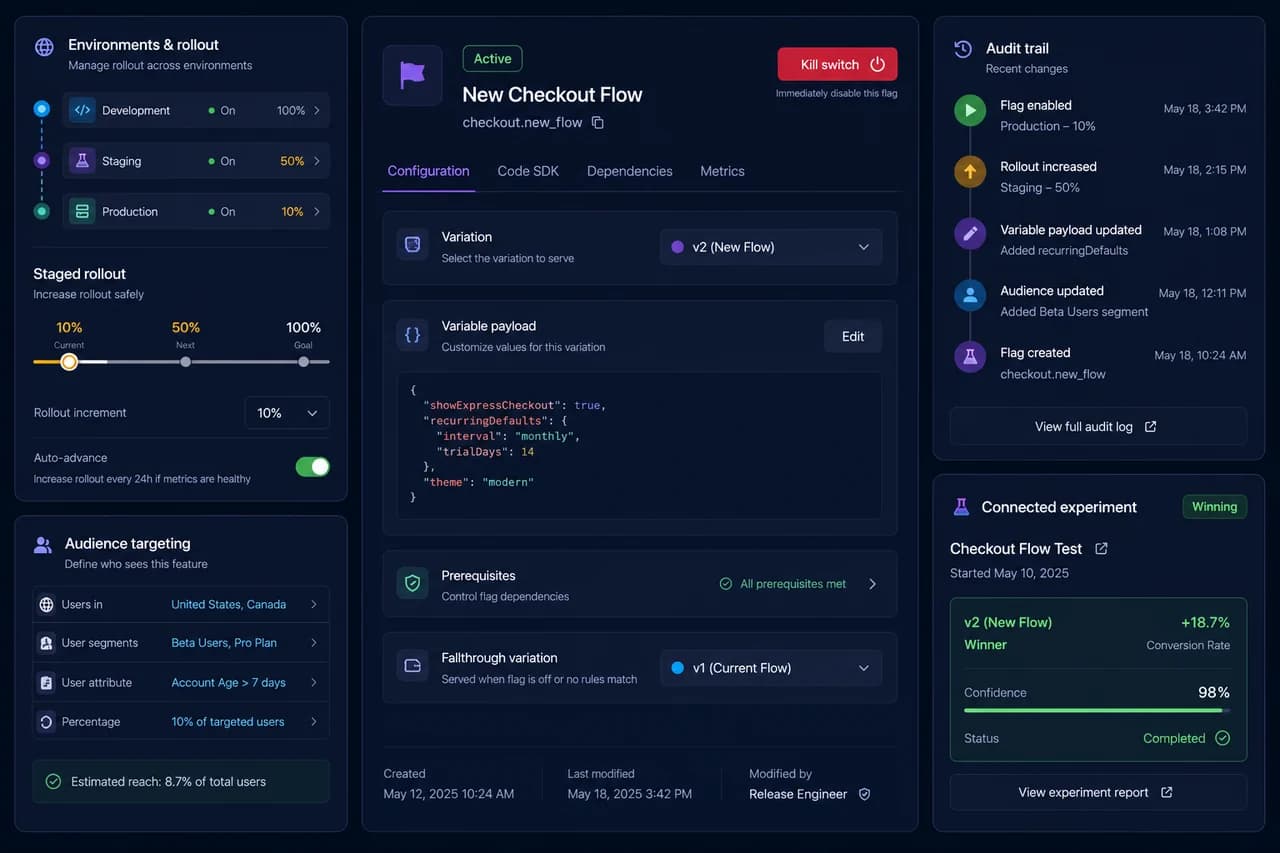
Feature flags and rollout

Boolean flags, variables, environments, kill switches and staged rollout give product and engineering one shared surface.

flagsrolloutenvs
05

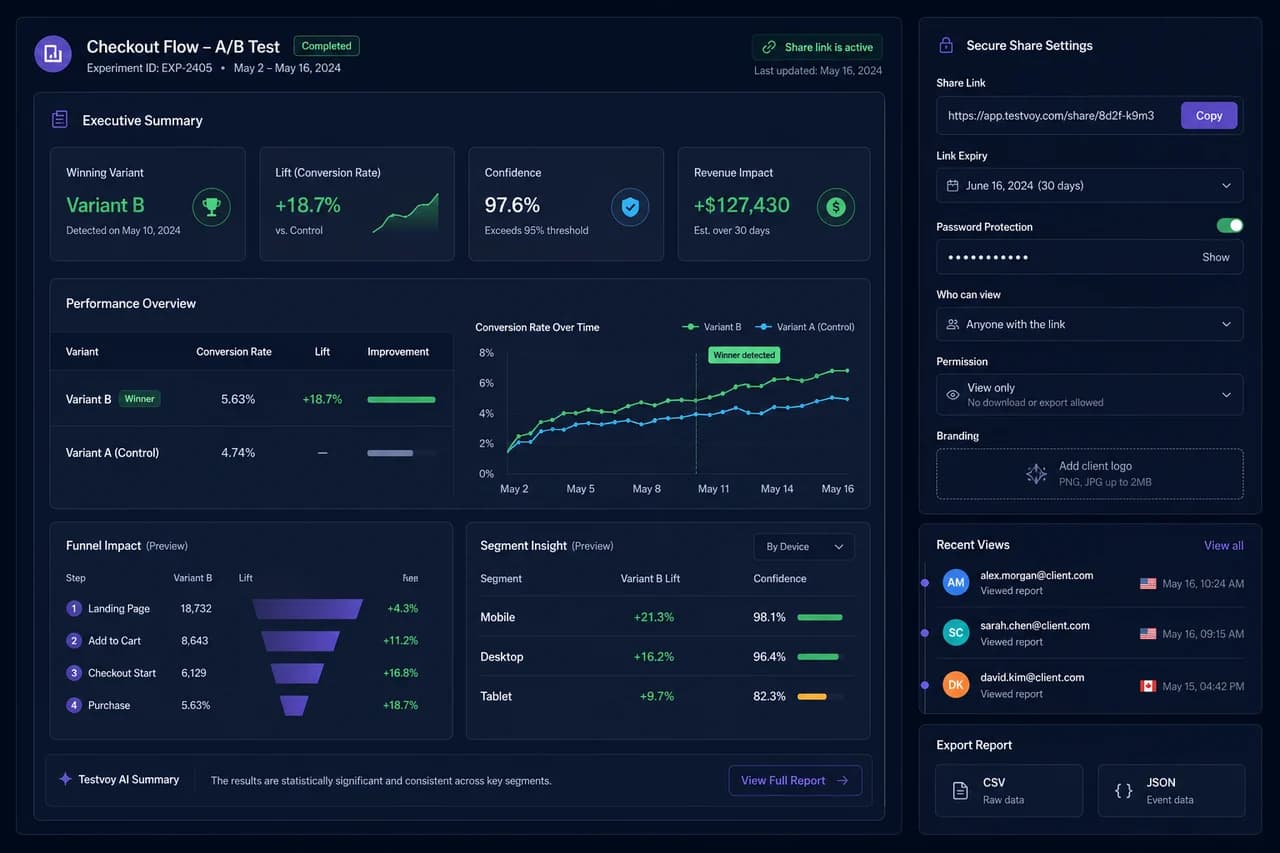
Shareable reports

Create polished report links for clients and teams, with expiry and revocation planned for protected sharing workflows.

clientsexpiryreports
06

Governance and audit

RBAC, audit views, bot filtering, SRM checks and security-first Enterprise packaging for teams with review requirements.

rbacsrmaudit
Statistics engine

Same data. Three lenses. One decision.

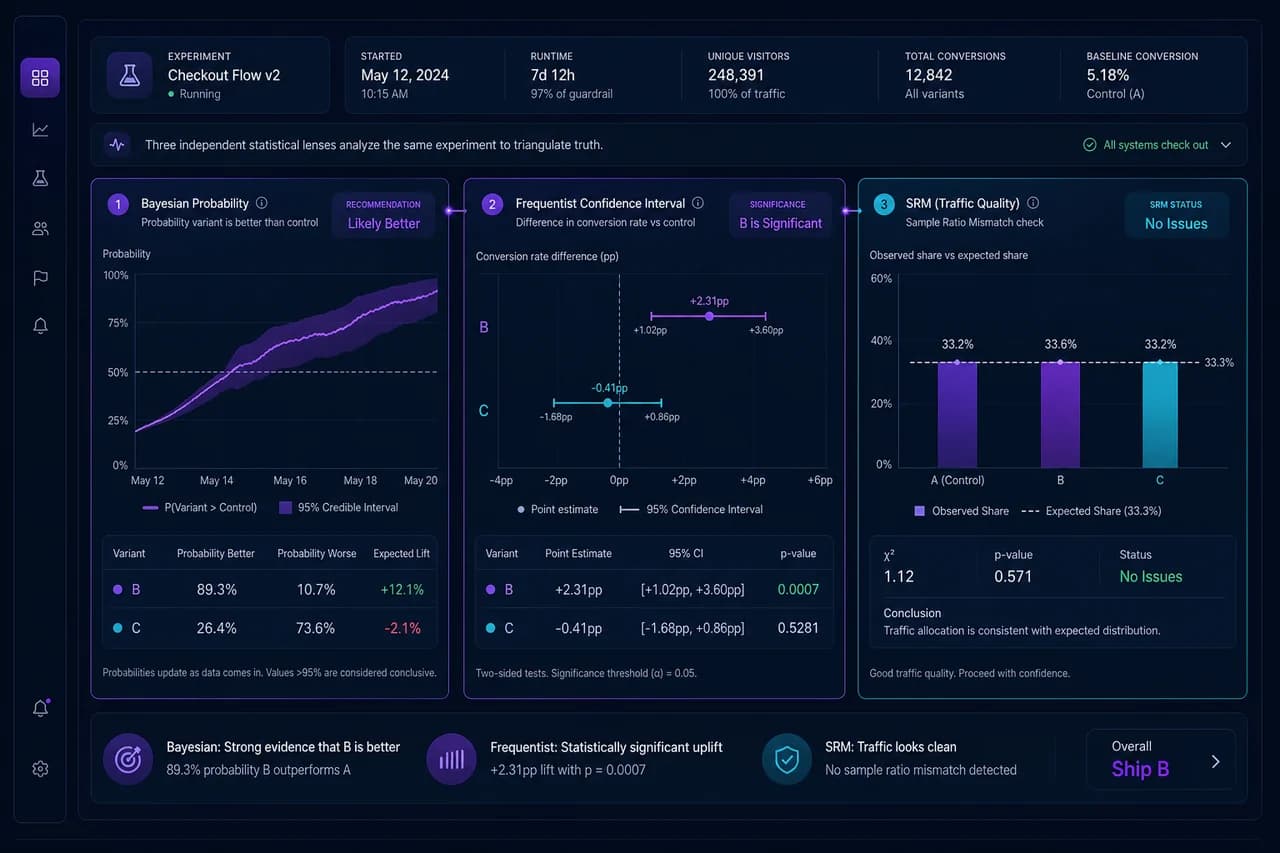
Testvoy does not collapse an experiment into one shiny score. The same experiment data is read through Bayesian decision probability, Frequentist validation and SRM bias detection at the same time. That means the team can see whether the result separates from noise, whether expected loss is acceptable and whether traffic allocation stayed trustworthy before acting on a winner.

01Decision probability

The Bayesian view explains how likely Variant B is to win and what loss you accept if the decision is wrong. It turns “should we ship this?” into a clearer business question.

02Classical validation

The Frequentist view keeps p-value and confidence interval visible for teams that need a familiar statistical readout. Data and leadership can review the same panel without a separate export.

03Bias guardrail

SRM Detection checks whether traffic split and sample allocation stayed healthy before lift is trusted. If tracking, bots or allocation drift distort the result, the decision is slowed down.

Read the methodology
Experiment detail · Stats selectorCheckout CTA · TR mobile

48,217 visitors · 50/50 traffic · purchase_complete

94.2%B win probability
0.018p-value
cleanSRM result
Jeffreys prior + Marsaglia-Tsang gamma sampling

Variant B has a 94.2% probability to win. Expected loss: 0.3%.

Decision probability and expected loss sit together instead of forcing the team to guess from a threshold.

pooled SE for p-value, unpooled SE for CI

p-value 0.018, 95% CI [+1.2%, +4.8%].

Teams that expect classical validation get p-value and confidence interval in the same experiment panel.

α=0.001, Microsoft ExP standard

Traffic allocation is healthy. No bias risk detected.

Before lift is trusted, sample-ratio health and allocation quality are checked.

5K MTU
Free plan traffic for setup validation
10 bands
Traffic levels from 10K to 5M MTU
20 %
Effective monthly discount on yearly billing
0 cards
Raw card data stored by Testvoy
Bot filtering and data integrity

Protect every result from bots and noisy traffic

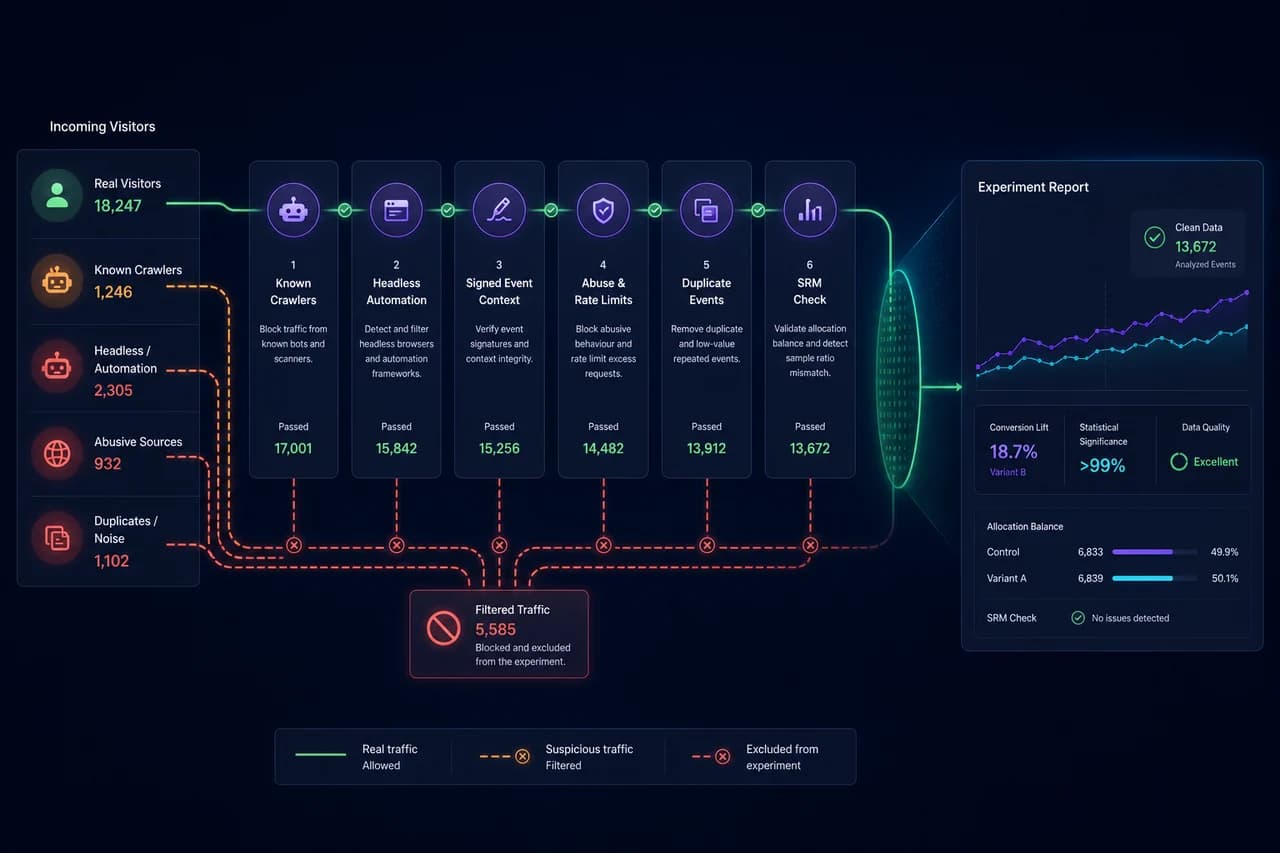
Testvoy checks suspicious traffic, signed event context, abuse patterns and sample-ratio quality before your reports turn into decisions. Your winning variant should be chosen by real user behavior, not by crawlers, duplicated events or polluted traffic.

01

Bot signature library

Known bot user agents, crawlers, headless browsers and automation traces are evaluated separately so they do not distort report accuracy.

02

Signed event context

SDK events are verified against signed project and experiment context, reducing the chance that fake or misplaced events pollute metrics.

03

Abuse and rate-limit guard

High-volume requests, duplicated event spam and public endpoint abuse are constrained so one source cannot inflate experiment data.

04

SRM quality checks

Sample Ratio Mismatch checks catch unexpected traffic allocation; if the split is not trustworthy, the team is warned before deciding.

05

Clean decision reports

Suspicious traffic does not simply disappear; reviewable signals and quality warnings support a trustworthy Growth and Enterprise decision workflow.

Privacy-first posture: raw card data, unnecessary personal data or sensitive customer data is not moved into the marketing site. The protection layer exists to protect experiment integrity and data security.

Funnel and segment reporting

See where users drop off with funnel and segment reporting

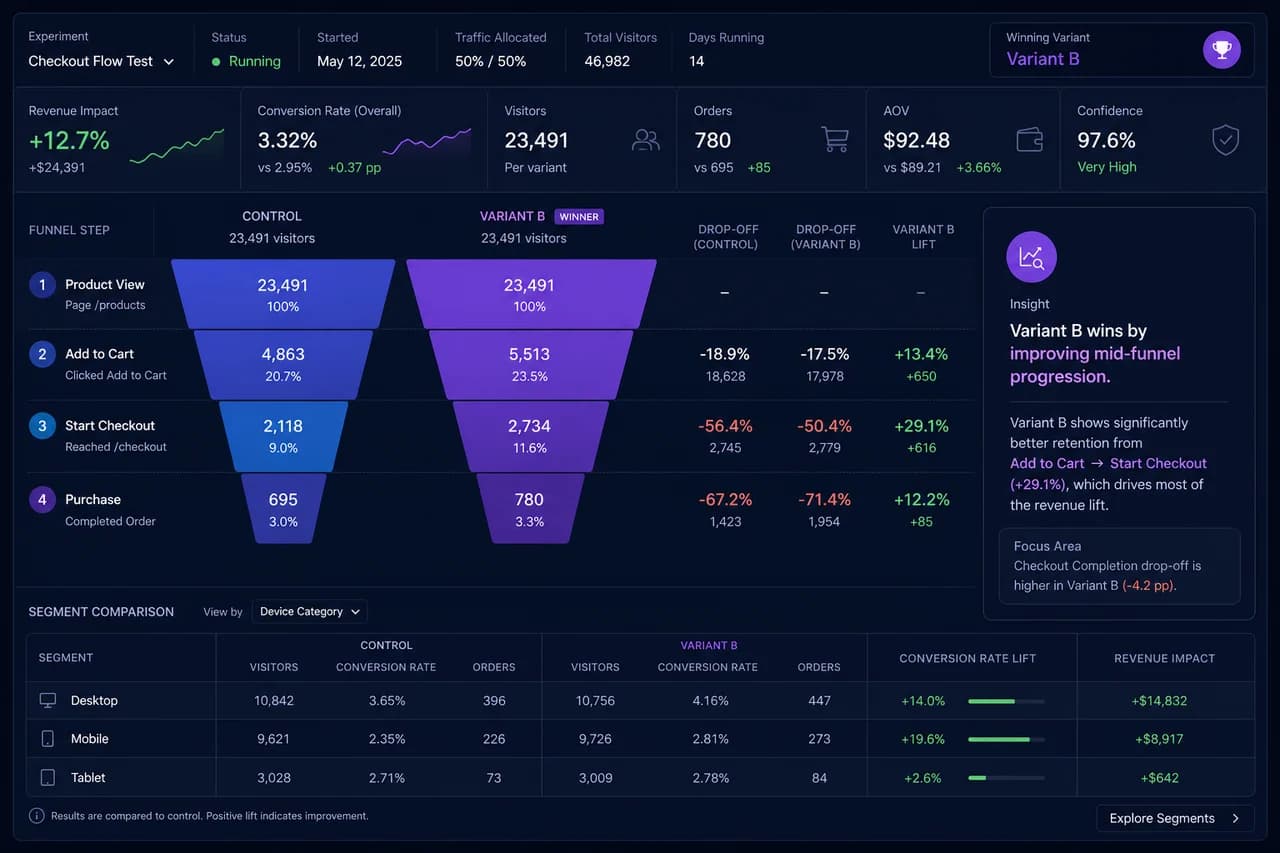
Testvoy shows how users move from the first step to conversion, where they drop off, and which segments change the result. You do not only see the winning variant. You understand why it wins or where the journey breaks.

01

Step-by-step funnel view

Read user count, progression rate and drop-off from landing page to completed signup.

02

Drop-off rates

A clean funnel view shows where the largest loss happens, helping the team decide where to intervene.

03

Per-variant breakdown

Control and variants are compared at every funnel step, not only by final conversion rate.

04

Segment comparison

Device, country, UTM, campaign source and new versus returning visitors reveal whether the result changes by audience.

05

Shareable reports

Funnel and segment insights can be shared with teams or clients, with CSV/JSON export for meeting-ready decisions.

Seeing the winner is not enough. Understand why it wins.
Visual editor

Build experiments without code using a marketer-friendly visual editor

Change headlines, test CTA copy, add banners, replace images or hide sections without waiting for a developer. Testvoy’s visual editor helps growth and marketing teams launch simple web experiments faster.

Edit headlines and CTAs

Prepare headline, body copy, button text and CTA variations in a marketer-friendly workflow.

Add banners and promo bars

Launch campaign messages, promo bars and lightweight banner tests without waiting on a code release.

Replace images

Test hero images, product visuals or category assets when the visual story needs to change.

Hide/show tests

Hide a section, show alternate content or compare simple page composition changes.

Preview and QA checks

Review changes in preview mode before launch, with QA checks that reduce the risk of broken experiments.

Custom CSS/JS

When no-code edits are not enough, advanced users can move with controlled custom CSS/JS.

Do not wait in the dev queue for every small test.
Personalization

Show the right variant to the right audience with personalization

New visitors, returning users, mobile traffic, Google Ads campaigns and customer segments do not behave the same. Testvoy helps you target each audience with the variant or campaign that fits them best.

Reusable audiences

Create audiences like returning visitors, mobile users, cart visitors or high-intent users once, then reuse them across experiments.

Behavioral targeting

Change the message based on page depth, cart visits, previous page views or returning visitor behavior.

UTM campaign personalization

Show campaign-aware offers for Google Ads, Meta Ads, email campaigns or influencer traffic.

Device and geo rules

Serve more relevant variants by mobile, desktop, country, city or browser context.

Customer attribute targeting

Differentiate the experience by plan type, lead status, customer tier or account type for SaaS and B2B teams.

Segment-level reporting

After a personalization campaign runs, see which segment responded best to which variant in the same report.

Stop showing everyone the same message. Match the experience to user intent.
Shareable reports

Move faster with shareable reports for teams and clients

Share experiment results without screenshots, manual decks or giving dashboard access. Testvoy creates secure, expiring and easy-to-read report links that help teams and agencies explain decisions faster.

Share without dashboard access

Teams, executives or clients can view the relevant experiment report without receiving full dashboard access.

Expiring report links

Report links can stay open for a defined window; expired links show a clear branded state.

Revocable sharing

If a link is no longer needed or reaches the wrong person, revoke access from the dashboard.

Branded report view

Instead of a raw dashboard, clients receive a polished report surface that is ready to share.

Funnel and segment insights

Show the winner with funnel progression, drop-off, segment breakdowns and revenue signals in context.

CSV/JSON export

Authenticated dashboard users can export CSV/JSON for meetings, data teams or client presentations.

Send a decision-ready report, not another screenshot.
Agency workspace

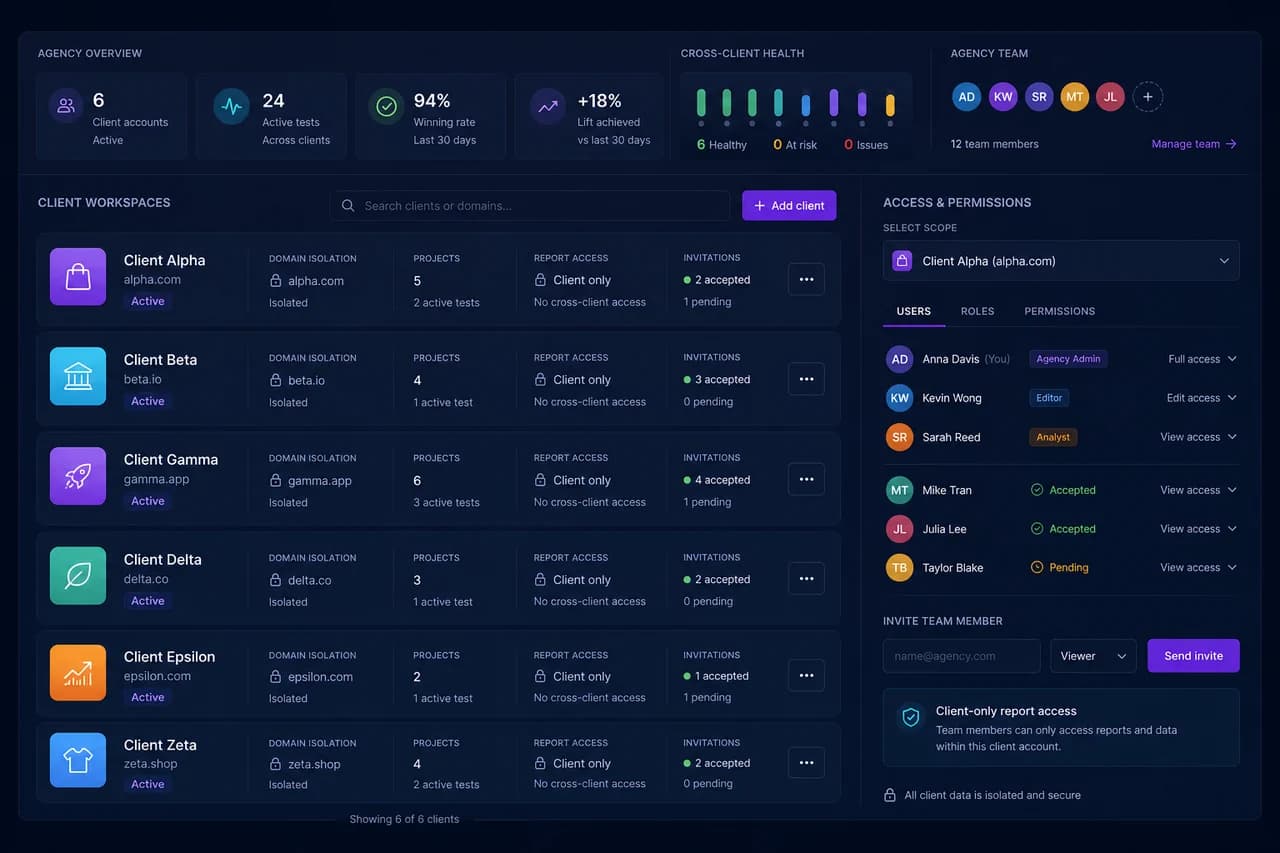
Manage client projects, experiments and reports in one agency workspace

Stop jumping between scattered client files, screenshots and dashboards. Testvoy gives agencies one workspace to manage client projects, experiment performance, shareable reports and team access.

Client-based project management

Each client can have its own site, experiment program and reporting scope from one panel.

Controlled team access

Use viewer, editor, approver and admin-style roles to scope access for teammates or clients.

Shareable client reports

Send expiring, revocable report links without giving clients full dashboard access.

Project health view

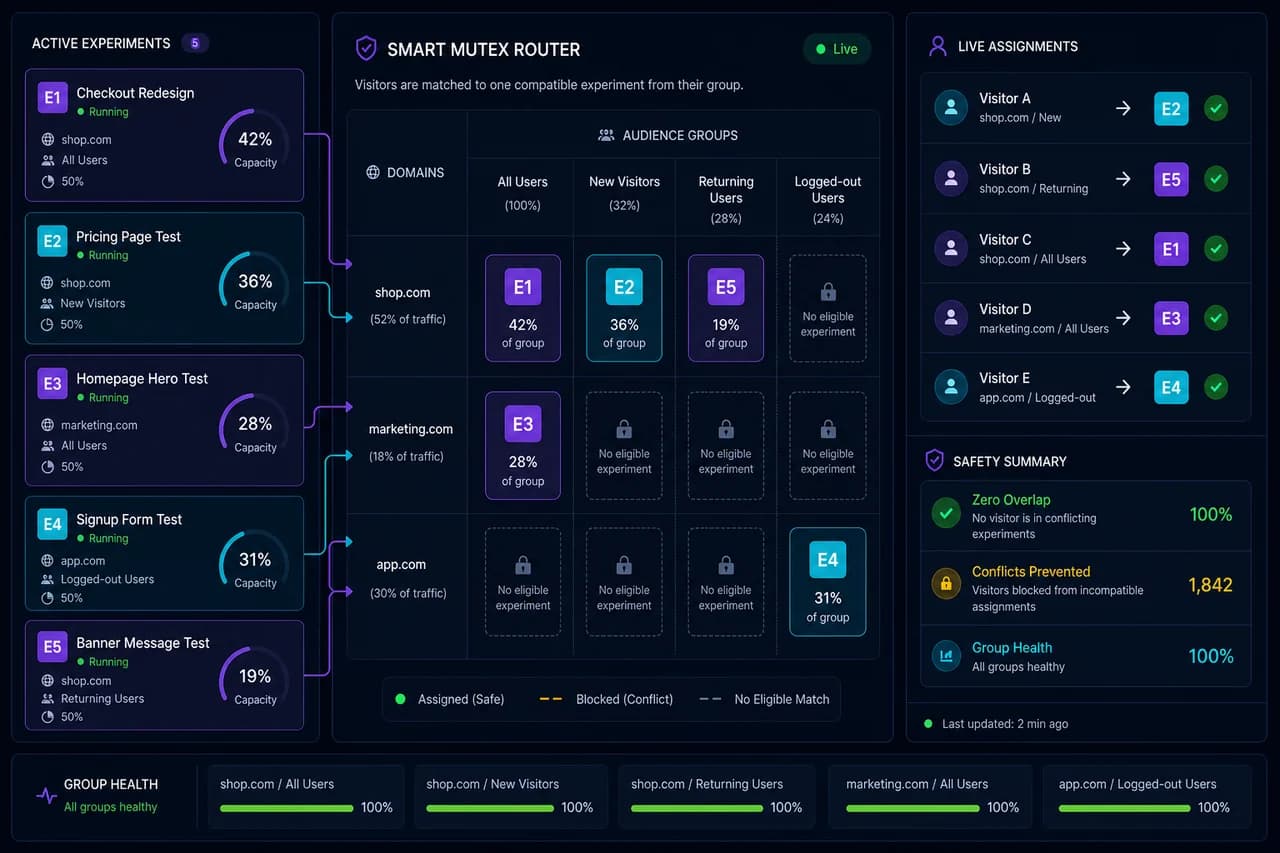
See SDK status, active tests, quota usage and possible conflict signals per client project.

Quota and usage tracking

Understand which client is using the most traffic and which project is approaching its limit.

One agency workspace

CRO agencies, performance teams and freelancers can keep client operations out of scattered files.

Manage every client from one agency workspace, not scattered files.
SDK, CDN and event security

Run fast and reliably with SDK, CDN and secure event delivery

Testvoy’s SDK is designed to load quickly, reduce flicker risk and deliver experiment events safely. Versioned CDN delivery, fallback behavior, signed context and retry logic help keep your measurement pipeline reliable.

Versioned CDN delivery

Serve the SDK from a controlled path like /sdk/v1/testvoy.min.js so installs stay predictable across client sites.

Lightweight browser SDK

The SDK focuses on running experiment and event flows with minimal friction on the customer site.

Anti-flicker loading

Variant application is designed to reduce flicker risk without promising impossible zero-flicker guarantees.

Fallback strategy

Fallback behavior helps keep experimentation and measurement less fragile during CDN or network issues.

Signed event context

Events are tied to the right project and experiment context, helping protect report integrity.

Queue and retry behavior

Controlled queue/retry behavior helps preserve event delivery during network changes or page exits.

Privacy-aware tracking

DNT/GPC, opt-out and unnecessary-data-minimization choices are treated as part of SDK behavior.

Experiments should load fast, and event data should move safely.
Launch sequence

An operating path that carries an idea safely to launch.

All the safeguards above come together in one short control line: the right environment, clean data, approved launch and a shareable result.

SDK healthyQA approvedClean trafficReport ready
Launch controlHomepage Hero Test
Ready for controlled launch
01

Prepare

Confirm the site, environment and goal from one launch preparation view.

SDK health: readyenvironment: productiongoal: purchase_complete
02

Check

QA, traffic quality and guardrail signals stay visible before the decision.

preview: approvedSRM guardrail: armedbot filter: active
03

Launch

Traffic allocation, audience scope and rollout coverage move forward deliberately.

allocation: 25% → 50%audience: matchedconflict check: clear
04

Share

When the result is ready, send it to the team, leadership or client with one link.

report: readyclient link: activenext: rollout winner
Decision quality

Explain the decision with an evidence package, not just a winning variant.

This is not another feature list. It shows how Testvoy turns an experiment result into a defensible decision record for teams, leadership and clients.

01
why ship

Evidence summary

Statistics, revenue and funnel signals are reduced into one decision sentence, so the team sees the reason rather than another metric list.

02
what to watch

Risk notes

SRM, bot filtering, SDK health and QA warnings stay visible as the issues that could weaken the decision.

03
who needs it

Stakeholder language

Growth, product, data and client-facing teams can explain the same result clearly in their own review meetings.

Short answer

Seeing the winner is not enough. You need to share why the decision is trustworthy.

Pricing model

Start the pricing decision here, then compare the matrix on pricing.

The homepage gives you the buying path: validate with Free, choose an MTU band and plan level for Pro/Growth, or talk to sales for Enterprise.

TR: TRY incl. VATEN: USDYearly: 20% effective discountEnterprise: sales CTA
Quick answers

What to know before opening the pricing page.

The detailed pricing matrix stays on pricing. This section only answers the decisions that affect the buying path.

Start

Why does the homepage not show the full pricing matrix?

Because /pricing is the canonical pricing table. The homepage only helps you choose the path: Free validation, Pro/Growth self-serve, or Enterprise sales.

Checkout

Where do Pro and Growth purchases happen?

The public site does not create checkout sessions. Plan CTAs send users to app.testvoy.com/register with sku and cadence parameters.

Enterprise

Why is Enterprise not direct checkout?

Enterprise often needs SSO, DPA, SLA, data residency or security review. A sales-assisted review is the better path after pricing intent.

Locale

How do TR and EN pricing views differ?

Turkish uses TRY and VAT-included language. English uses USD. Yearly billing explains the effective monthly price with a 20% discount.

Trust

Does the public site touch billing or dashboard data?

No. testvoy.com is the marketing, docs, pricing, support and trust surface. Login, register, dashboard, billing and checkout stay on app.testvoy.com.

Free plan · Pro/Growth self-serve

Run a first test, then grow into a complete experimentation program.

Start free on app.testvoy.com, compare traffic bands in pricing, or talk to sales for Enterprise security, SLA and data requirements.

No app auth on the public site · Login, dashboard, billing and checkout stay on app.testvoy.com
testvoy