Domain, project, event and report context is separated across clients.
Agency workspaces
Give every client their own account and manage the portfolio centrally.
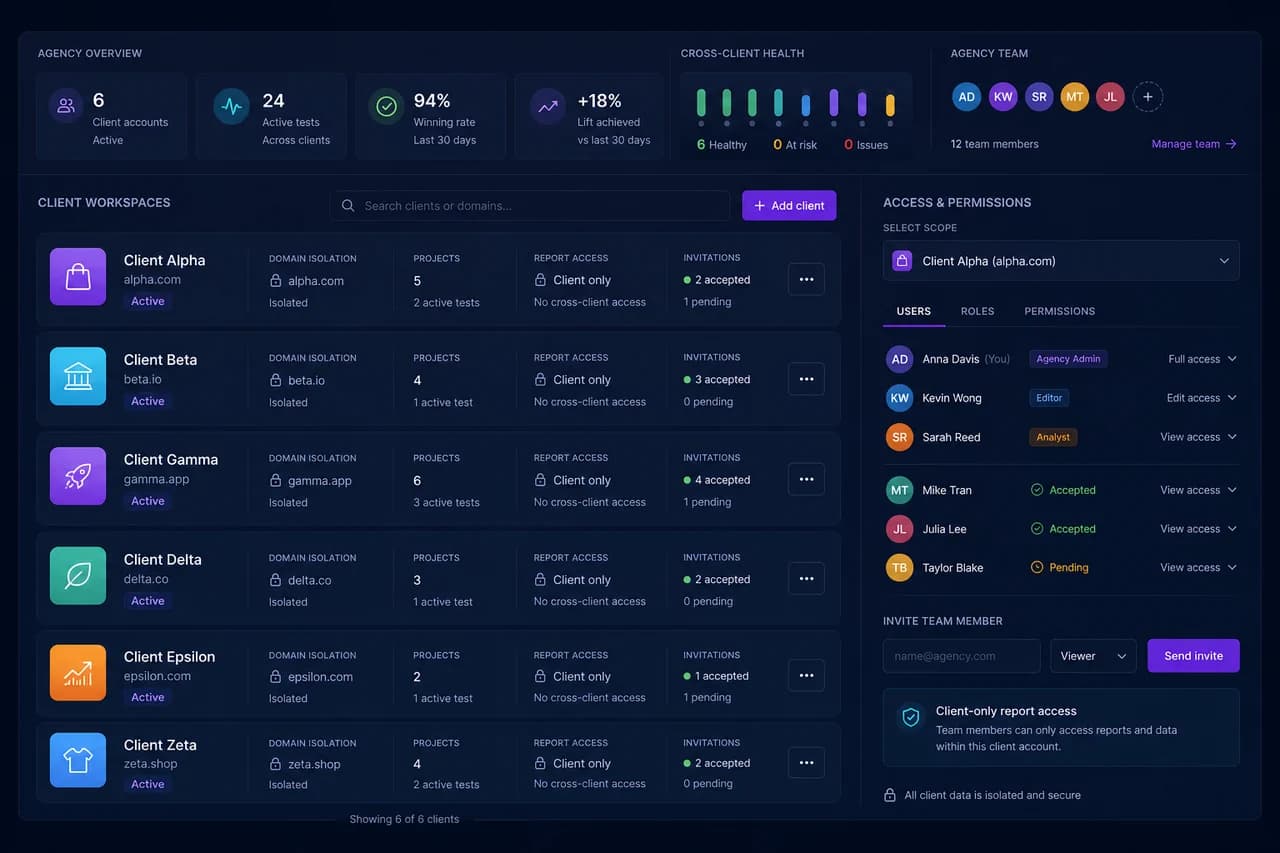
Testvoy Agency Workspaces isolates client accounts, domains, projects, roles and report access. Agency teams see the full operation while clients work only with the experiments and reports opened to them.
Agency-scale control
Giving a client access should not expose the agency's entire operation.
Testvoy Agency Workspaces gives every client a separate account, project, domain and permission scope. Agency admins see portfolio health and active experiments while client users stay inside their own workspace with role-limited access.
Viewer, analyst and editor roles give the right user the right authority.
Agencies monitor active clients and experiments from one management view.
Clients receive an appropriate account and report experience instead of dashboard complexity.
Product capabilities
The core job Testvoy solves with this module.
This section shows what the module helps teams do, which risks it reduces and which decision it makes easier to defend.
Back to product hub01
Create an isolated workspace per client
Separate client data, domains and projects from other accounts and add new clients through a repeatable setup path.
- Client-level account and domain isolation
- Multiple projects and brands
- Central agency view
02
Give clients the right level of access
Use viewer, analyst or custom roles to control who can see tests, download reports and change settings.
- Role-based access
- Invitation and acceptance status
- Client-only report permission
03
Monitor operations at portfolio level
See active tests, client health, wins and reporting state in one place without losing context between accounts.
- Cross-client health
- Active experiment summary
- Agency team ownership
Where teams use it
Built for the experiment and optimization workflows teams run every week.
Multi-client CRO operations
Set up separate domains and projects for every brand while preserving a central agency view.
Bring client analysts into the process
Give the client's analyst a controlled account that exposes only their experiments and reports.
A near-white-label report experience
Use client branding and secure share links to raise delivery quality to the agency standard.
Decision path
The role this module plays in the experiment program.
Create an isolated workspace per client
Separate client data, domains and projects from other accounts and add new clients through a repeatable setup path.
Client-level account and domain isolation
Multiple projects and brands
Give clients the right level of access
Use viewer, analyst or custom roles to control who can see tests, download reports and change settings.
Isolation
Separate data and access scope per client
How it works
Clearer setup, cleaner signals, faster decisions.
Testvoy positions this module to help teams move from experiment idea to report with the same data, context and decision language.
Data isolation is the foundation of agency trust
A client must never see another brand's domain, experiment or report. Testvoy combines account and project scope with authorization to preserve separation across the portfolio.
- Client accounts carry separate domain and project scope
- Cross-client access stays outside client roles
- Agency admins preserve portfolio visibility
Role-based access accelerates client collaboration
Clients want different levels of participation. Some only review reports, others inspect funnels and some comment on setup. Roles and permissions make that difference manageable.
- Viewers stay in read-only flows
- Analysts inspect reports and breakdowns
- Editor access is granted deliberately
Portfolio visibility lowers operating cost
Instead of opening every client account to check status, agencies can review active tests, risk, wins and invitations from one central view.
- Active tests and client health stay together
- Team ownership is managed centrally
- Report delivery and invitations remain visible
FAQ
Fast answers before the decision.
Can every client have a separate Testvoy account?
Yes. Agency plans can create an isolated workspace and controlled user access for each client.
Can a client see other brands?
No. Access is limited by client account, project and role; cross-client visibility remains with agency administration.
How many domains can an agency manage?
Agency plans are designed for multiple clients and domains, with commercial scope defined in the agency agreement.
Can a client receive report-only access?
Yes. Viewer or client-only report permission can expose results without allowing setup changes.
Isolated client accounts, multi-domain management, role-based access and client-ready reporting for experimentation agencies.
Multiple clients, domains and projects