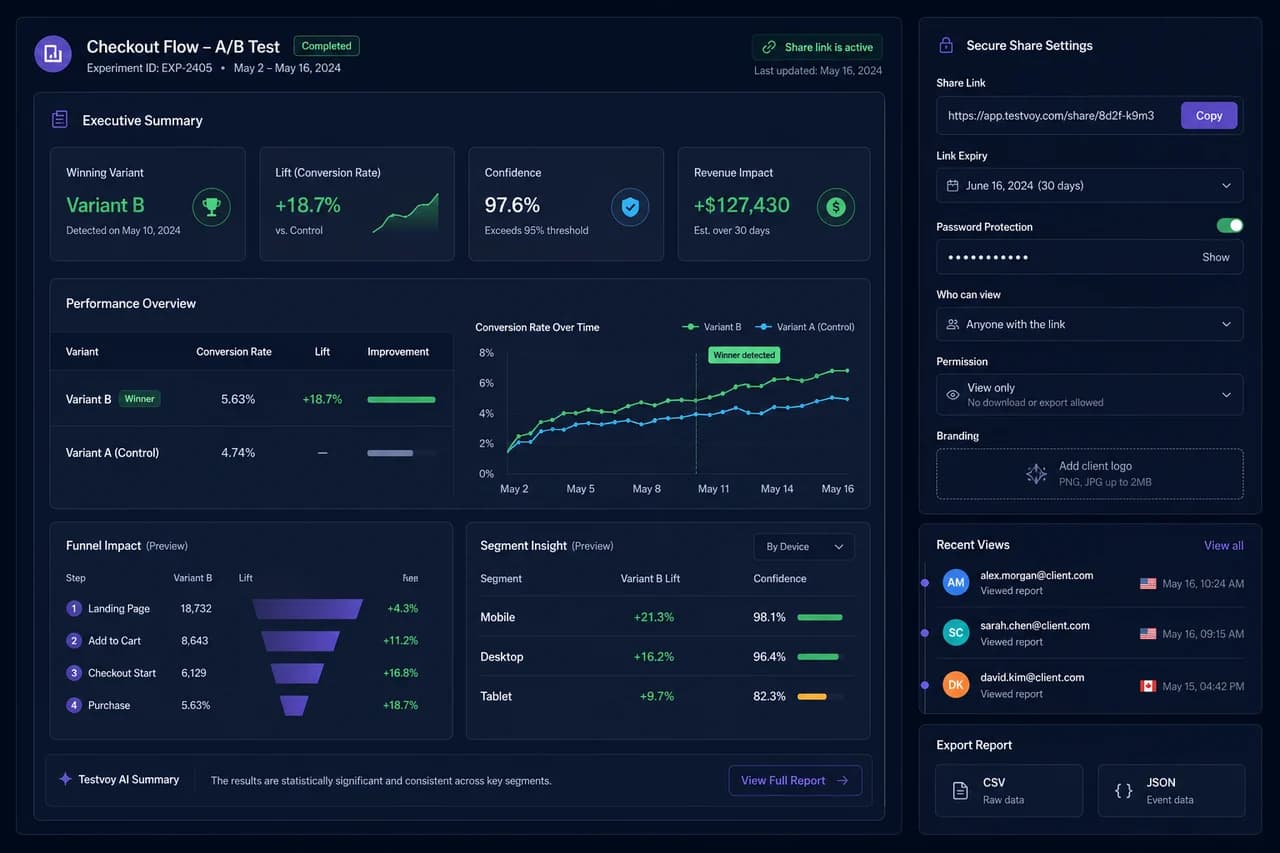
Winner, lift, confidence and revenue appear on the report's first screen.
Advanced report sharing
Share the report, not dashboard access.
Testvoy Shareable Reports combines the winner, lift, statistical confidence, revenue impact, funnel and segment insight into one decision story. Expiry, password, viewer and export controls make it safe to send to clients or executives.
Turn decisions into presentations
A strong experiment report explains why the winner won.
Testvoy Shareable Reports combines statistics, revenue impact, funnel flow, segment differences and decision notes in one professional report. Share it through a secure link without creating a dashboard account, limit access and track viewing activity.
The user journey and audience differences behind the decision are explained.
Expiry, password and viewer permission limit report access.
CSV and JSON outputs can accompany the live report.
Product capabilities
The core job Testvoy solves with this module.
This section shows what the module helps teams do, which risks it reduces and which decision it makes easier to defend.
Back to product hub01
Tell the decision story on one screen
Winner, conversion lift, confidence, revenue and test status are clear at first glance without assembling screenshots for every meeting.
- Executive summary
- Winner and lift view
- Statistics and revenue context
02
Add funnel and segment context
Support the decision with step-level funnel impact and device, UTM or country segments instead of only the aggregate rate.
- Funnel preview
- Segment insight
- Decision note and result summary
03
Keep sharing secure and measurable
Set link expiry, password, viewer role and export permission, then track when the report was viewed.
- Expiry and password protection
- View-only or export permission
- View activity and client branding
Where teams use it
Built for the experiment and optimization workflows teams run every week.
Agency client presentations
Send one branded, secure report link instead of a folder of screenshots.
Executive decision reviews
Explain the winner, risk, revenue and next action without burying stakeholders in statistics.
Data and product handoff
Add CSV or JSON export for teams that need deeper analysis beyond the web report.
Decision path
The role this module plays in the experiment program.
Tell the decision story on one screen
Winner, conversion lift, confidence, revenue and test status are clear at first glance without assembling screenshots for every meeting.
Executive summary
Winner and lift view
Add funnel and segment context
Support the decision with step-level funnel impact and device, UTM or country segments instead of only the aggregate rate.
Handoff
Decision report without a dashboard account
How it works
Clearer setup, cleaner signals, faster decisions.
Testvoy positions this module to help teams move from experiment idea to report with the same data, context and decision language.
The executive summary is the entry point to the decision
Stakeholders first ask which variant won, how large the effect was and whether it can be trusted. Putting those signals first keeps meetings from turning into metric hunts.
- Winner and lift appear together
- Confidence or decision probability adds context
- Revenue impact exposes commercial value
Funnel and segment insight make the result explainable
Aggregate conversion rate cannot answer why. Funnel steps reveal where the variant improved, while segments show which audience carried the result.
- Step-level drop-off enters the report
- Device, UTM and country segments can be compared
- Decision notes capture the next action
Secure sharing is a better alternative to broad dashboard access
Creating an application account for every stakeholder adds management cost and unnecessary access risk. Expiring, password-protected and view-only links share only the decision report.
- Set an expiry date for the link
- Apply password and viewer permission
- Track view activity and export rights
FAQ
Fast answers before the decision.
Does someone need a Testvoy account to view a report?
A secure share link can provide report access without granting a full dashboard account.
Can a share link expire?
Yes. Expiry date, password protection and viewer permission can limit access.
Can client branding appear on the report?
Agency and advanced reporting flows can include a controlled client-branding area.
Which export formats are supported?
CSV and JSON export flows can accompany the web report for analysis and archiving.
A stakeholder-ready experiment report with executive summary, funnel and segment insight, secure links, client branding and export controls.
Expiry, password and permission controls